01

PSA software for MSPs · The daily command centreYour whole day on one screen.

The personal productivity layer no other platform in this market has — and the reason people open Tracmar first thing, rather than when a job forces them to.
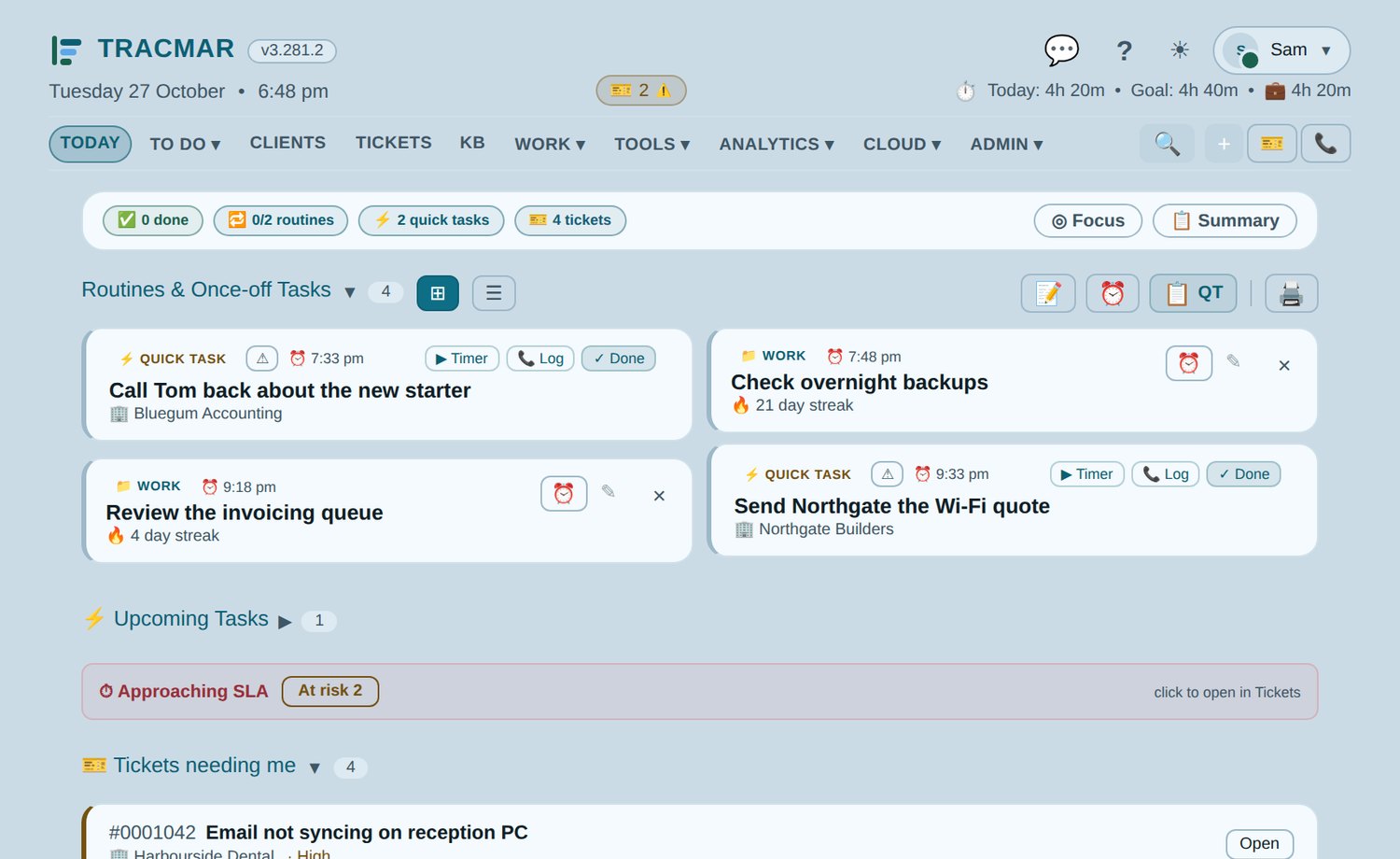
Tracmar Today page with routines, quick tasks and the jobs that need you (demo data)
Today. Routines with streaks, quick tasks linked to clients and jobs, and a glance row that says what is still outstanding before you have scrolled.
  • Routines and streaksDaily, weekly and one-off work with flexible recurrence, carry-over and skip tracking. A routine done today drops off the list rather than sitting there ticked.
  • Quick tasksAd-hoc work linked to a client and a job, appearing on the day it is due, with a timer that logs straight back to it.
  • What needs youAssigned to you, or overdue, without opening the job list.
  • Dual focus timersTwo independent timers with one-click logging, which survive switching apps on a phone.
  • Mobile view NewPurpose-built for the field, so work can be ticked off, timed and closed on site.
  • TM Bot, which acts when you ask NewAsk it to log the time, add a note, close the job, reassign it or book a visit: it shows you the change and waits for your OK, unless you tell it to just do it. It also answers "how did we fix this last time?" from past notes, time and the knowledge base.
  • Nudges and a team botAn end-of-day billing nudge, a morning roster of overdue work, a weekly recap, and a bot that messages on your own conditions — a goal reached, a valuable job closed, overdue tasks piling up — as the bot or in the owner's own name. Every one has a switch.
02

Service delivery

An SLA that measures the promise you made.

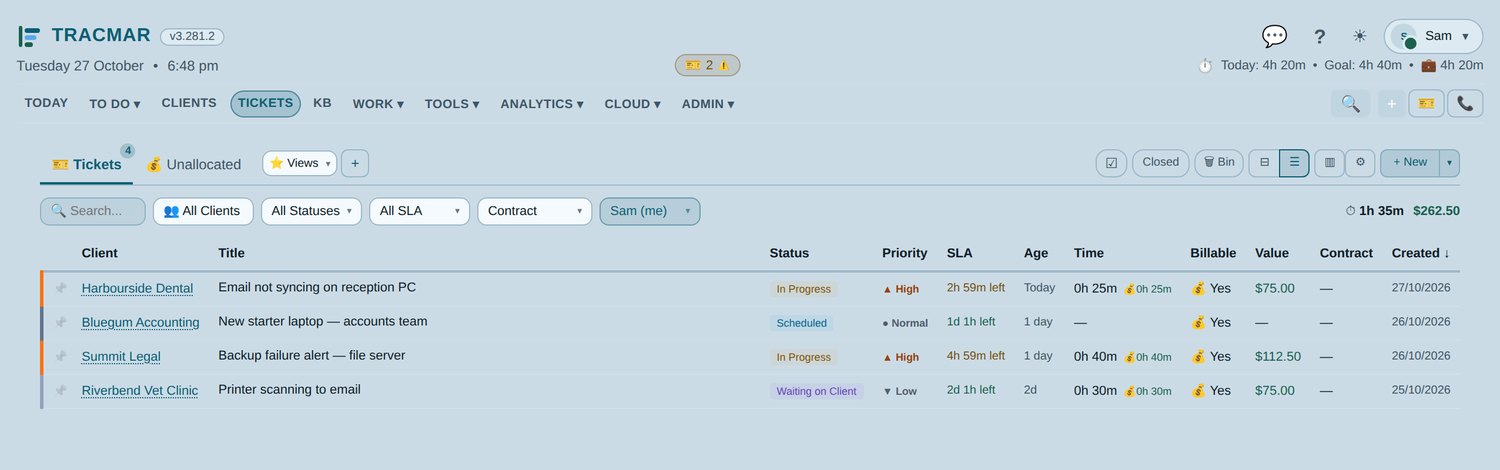
The clock stops when the job is resolved, not when somebody remembers to close it. A status like Awaiting Parts pauses the clock and banks the remaining time — so you are not judged on days you spent waiting for a supplier.

Tracmar job list with a live SLA status on every ticket (demo data)
The list. On Track, At Risk, Critical and Breached — live, per job, and paused where a status has stopped the clock.
  • Checklists that carry the job NewPer-step priority with filtering, notes against any step, completed steps collapsed away, and two printouts — the whole record, or only what is left.
  • Checklist PDFs to the client NewEmailed as a branded PDF now, at a set time, or repeating until the job is finished. Every send is logged.
  • Email into jobs NewYour support@ mailbox, read by Tracmar: a reply that names a job becomes a note on it, a new email from a known client raises a job. Set up in Settings with your own mailbox.
  • Child jobs NewSplit work to a colleague with their own checklist and labour. The parent cannot close until the children are; time rolls up and bills as one job.
  • Scheduled workPlanned for a future date with no SLA running until it starts. Appears in the list, the team calendar and the daily digest.
  • Tidy as you go NewMerge a duplicate job into the right one, move time between jobs, a 30-day Bin for anything deleted, and a featured note that pops up over the job's title in the list.
  • Load balancing NewPooled jobs handed to whoever is furthest behind their goal, one at a time, around leave dates. Urgent, booked and started work is never moved.
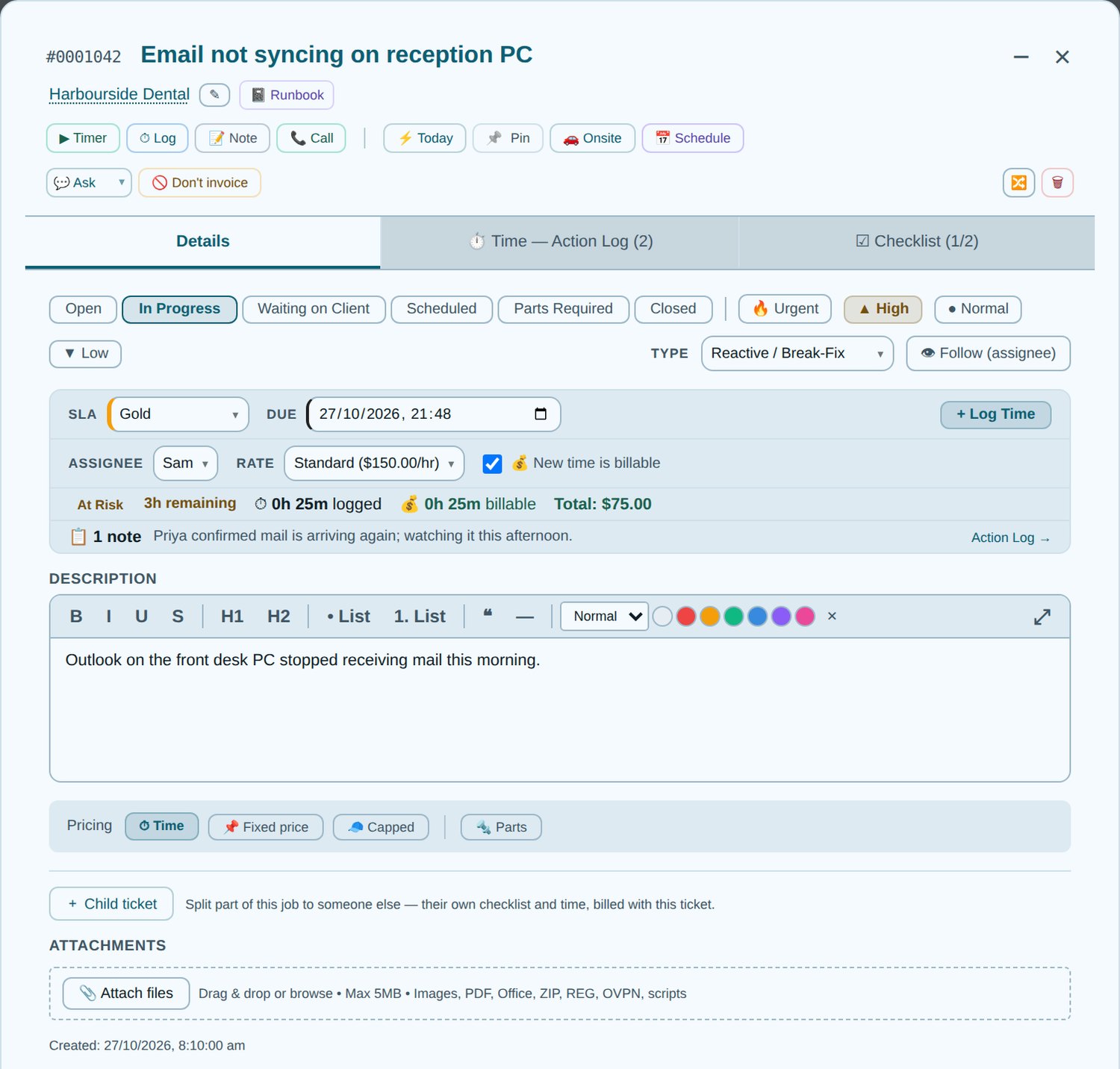
Inside a Tracmar job: SLA clock, time log, checklist and notes (demo data)
Inside a job. SLA tier and time remaining, assignee and charge rate, logged against billable time, and the pricing mode — by time, fixed, capped or parts.
03

Time tracking & billing

From the clock to the invoice.

Time is captured where the work happens — on the job, the task, the call or the timer — and reaches Xero without being retyped. How the Xero integration works.

The number on the job, the number on the dashboard and the number on the invoice are the same number — because they are all reading the same rule, from the same place.

One home per ruleThe contract split and the billing increment are defined once and imported everywhere. A rate change happens in one place and every screen that quotes it moves together.
Nothing bills twiceA time log records the task that created it, so completing that task again cannot re-bill the work. Write-offs leave invoicing entirely and stop consuming contract hours.
Nothing bills lateClosed, uninvoiced work is counted for you and raised once it is worth a run — so the month does not end with time nobody remembered to put on a bill.
  • Parts and materials NewLine items with Xero item codes, sold at their own price alongside the labour and never absorbed by an allowance.
  • Fixed and capped pricing NewQuote a job as a price rather than by the hour. Capped bills the hours but never past the figure agreed.
  • Contract trackingMonthly agreement hours per client with Covered, Partial and Overage status, and overage rates that apply themselves.
  • Unallocated timeBillable time with no job surfaces for allocation, with reasoned write-offs and an audit trail of who decided what.
  • Debtors and receivables NewAged receivables from Xero, emailed statements, email and SMS reminders with pay-now links, payments received, and each client's usual pay habits.
  • Xero drafts, finished here NewCheck, fix and merge the drafts where the work was logged, then approve or send them. Tracmar warns you about empty lines, missing emails and likely duplicates first.
  • Tax is Xero's jobLine amounts are sent tax-inclusive and your own Xero organisation computes the rest — which is why the same build works outside Australia.
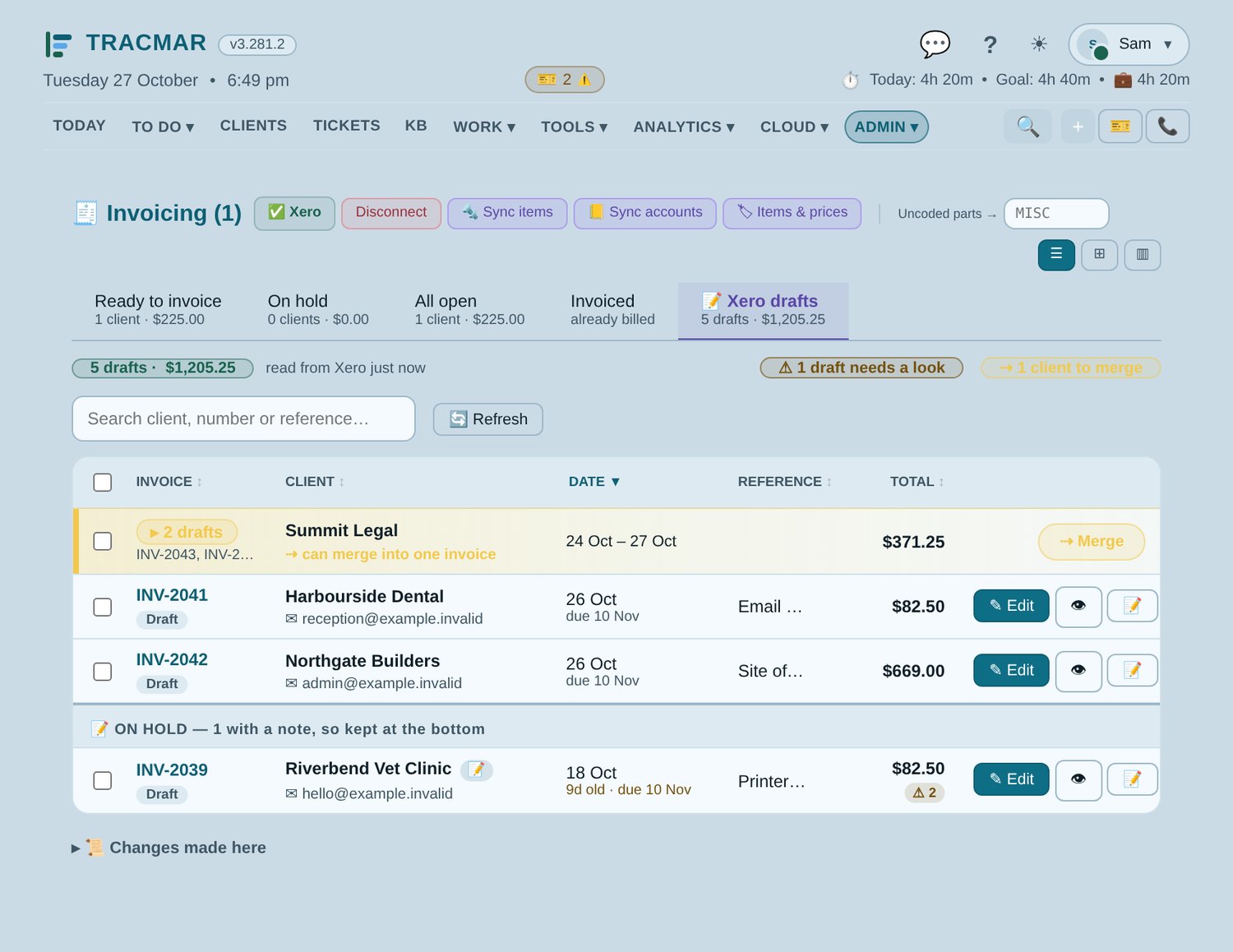
Tracmar's Xero drafts list: drafts grouped by client, checks and an on-hold note (demo data)
Xero drafts. Every draft in Xero, grouped by client so two can become one invoice, with a warning on anything worth a second look and the ones on hold kept at the bottom.
04

Clients & CRM

One record everything else hangs off.

Open jobs, hours this month and last contact stay in the header wherever you opened the client from — so you never answer the phone without the context.

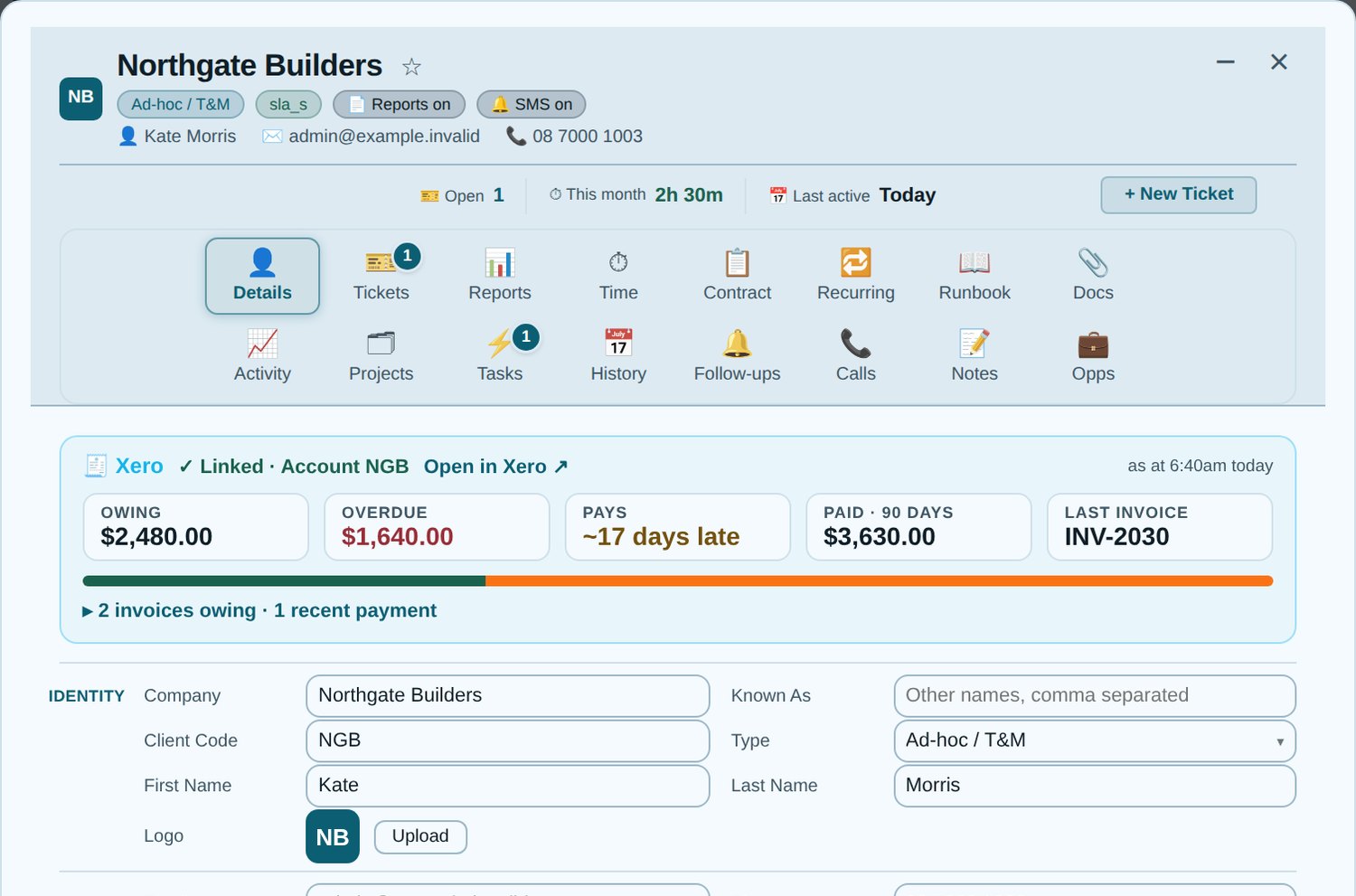
Tracmar client record with the Xero card: owing, overdue, how they pay (demo data)
The client record. What they owe and how they pay, straight from Xero, above their contacts, SLA and billing — with tickets, reports, time, recurring invoices, runbook and documents behind the tabs.
  • Xero on the record NewCreate a client once and it appears in Xero, or is linked to the contact already there. What they owe, how late they usually pay and their recent payments show on their record.
  • Password a file NewEmail a client an AES-256 encrypted file in two clicks; the password is remembered for them, and only a hint goes in the email.
  • Your history comes with youImport jobs, time, notes and contacts from the old system as CSV — dry run first, nothing doubled on a second run.
  • Activity timeline NewCalls, jobs, emails, time, tasks, notes, SMS and write-offs in one filterable feed — the whole history of a relationship on one tab.
  • Auto last contact NewUpdates itself from job notes, logged calls, and the emails Tracmar sends the client — checklists, reports and alerts. No manual upkeep, so it is still true in six months.
  • Encrypted runbookPer-client credentials and procedures, encrypted at rest, with private entries only their owner can open.
  • Opportunities, calls and SMSA kanban pipeline, call logging with follow-ups, and templated SMS with opt-outs and onsite reminders.
05

Projects & insight

Is this week going well?

Answering that in most platforms means building a report. Here it is the page you land on.

Tracmar business dashboard with recent ticket activity and client health (demo data)
The dashboard. Hours and billable hours against the same point last week, live activity, and which clients have something overdue or have gone quiet.
  • Revenue and hours trendsBillable revenue and hours over 4, 6, 12 or 26 weeks, against the same period before, with work in progress and what is waiting to be invoiced at the top.
  • A summary written for you NewA weekly, fortnightly or monthly summary of what happened, written by AI from your own figures, emailed or on the dashboard.
  • SLA healthBreached, due soon, healthy and no-SLA at a glance, each clickable straight into the filtered list.
  • ProjectsTasks and subtasks with assignees, priorities and due dates, per client — and what is assigned to you surfaces on your Today page.
  • Shared team calendar NewDay, week and month views of everyone's scheduled work — side by side or overlaid.
  • Who sees the moneyYou choose who sees billing figures. Staff get their own dashboard: their work, their time, their routines.
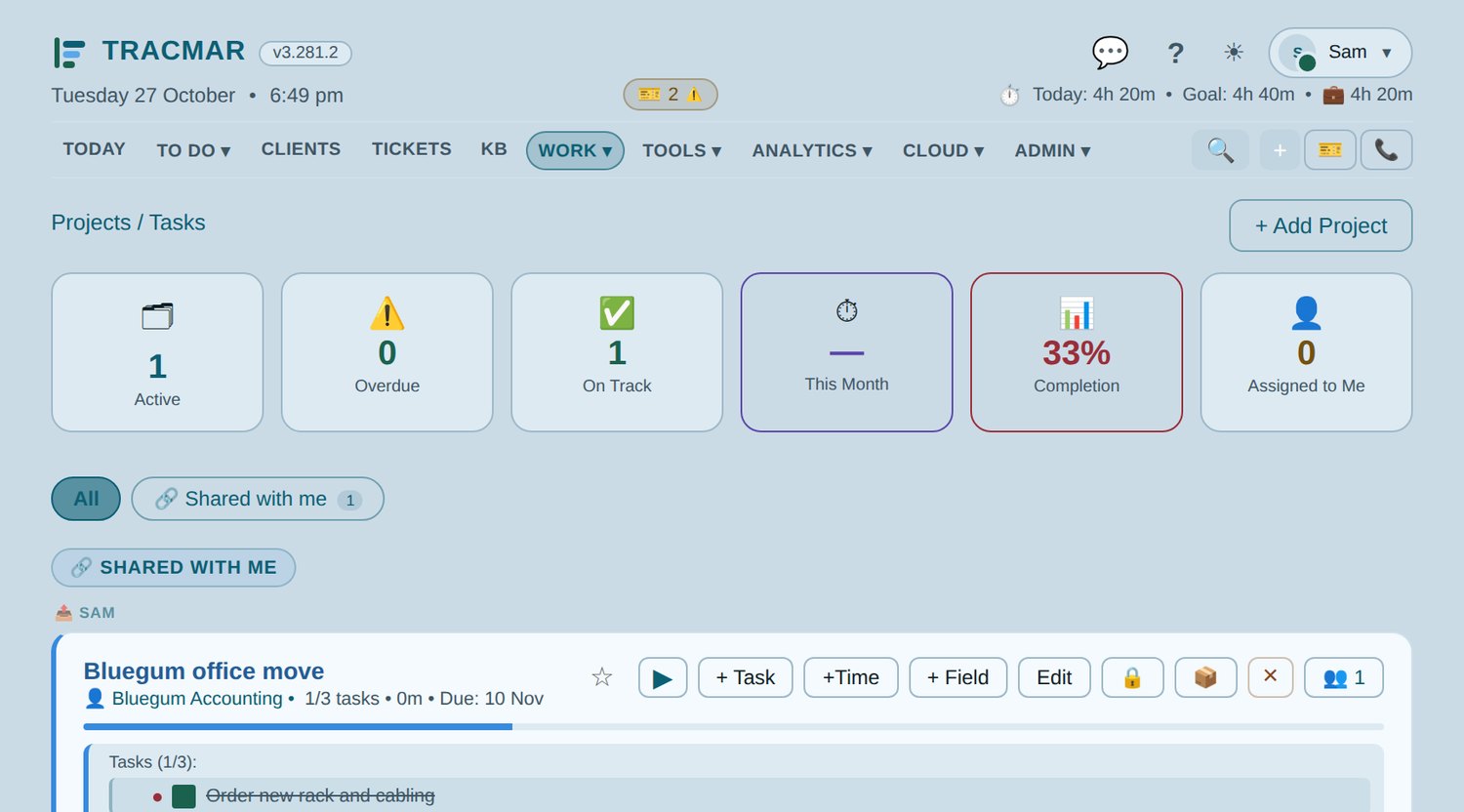
Tracmar projects screen with assigned tasks and a project task list (demo data)
Projects. Longer work tracked where the day is, so nothing lives in a spreadsheet nobody opens.

Next step

Ready to replace your PSA?

Every deployment starts with a conversation, not a signup form. We will look at how you work now, plan the migration from Halo or CSV, configure your instance, and agree a go-live date with you once we have seen your setup.

08 8358 0944

Adelaide, South Australia  ·  hello@tracmar.au

Download the overview (PDF)

No details needed for the download. Prefer a walkthrough? Leave your name and company in the form and we will ring you.

🔒 Spam check

What happens to what you send: privacy.

No newsletter, no drip sequence. A person reads it and replies.